What a Dying CR2032 Takes With It, and What It Leaves Behind
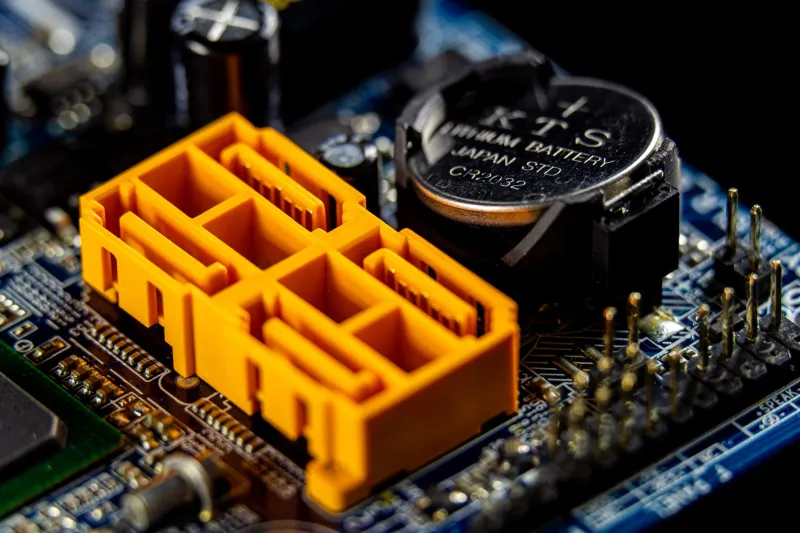
Every desktop in service still carries a deliberate anachronism: a 3-volt lithium coin cell, nominally 220 milliamp-hours, sitting in a holder beside the chipset. It exists because one part of the machine never fully powers down, and that part needs a trickle of current when the wall is unplugged.
The CR2032 has a rated life measured in years, and it is the only consumable on a motherboard that most owners never think to replace on a schedule. When it finally sags, the symptoms arrive in an order that makes them easy to misdiagnose.
The stubborn few hundred bytes
Historically, the battery backed a small SRAM block in the chipset that held BIOS settings — the complementary metal-oxide semiconductor memory that gave CMOS its name. Modern UEFI firmware moved the bulk of configuration into SPI flash, which does not need a battery at all.
What stayed behind is a much smaller set of functions that genuinely require continuous power: the real-time clock, a validity flag or checksum, and a block of chipset registers that must hold their state across a full power loss. Around that core, board firmware has accumulated a few habits that vary by vendor.
What actually lives there in 2026
The real-time clock and its century byte are the obvious residents. Alongside them sit the checksum or validity markers that tell firmware whether the stored configuration should be trusted, and the power-on strap values the chipset reads in the first milliseconds after standby power appears.
On many boards, a copy of setup variables — boot device ordering among them — is written back to battery-backed storage or mirrored there, which is why a dead cell so often resets the boot order even though the master copy lives in flash. Fan profiles, memory profiles, and CPU configuration settings frequently revert for the same reason. Chassis intrusion latches, wake-on-LAN flags, and certain ACPI state bits are held in the same region. On laptops, the embedded controller keeps some of its own state there as well.
Whether a BIOS password or Secure Boot key database survives a battery pull depends entirely on how the vendor implemented clearing. On some boards the coin cell is the only path to a reset; on others the jumper governs and the battery is irrelevant to security state. Assume nothing and check the manual.
What it does not erase
The firmware image itself lives in SPI flash and is untouched. Microcode, the management engine or platform security processor region, and the boot block all survive. Drive contents are unaffected. The discrete TPM, if present, keeps its own state — though that is where the complications begin.
The part everyone forgets: BitLocker
Windows disk encryption seals its volume key against measurements of the boot environment. Change enough of that environment and the system demands a recovery key at the next boot. Clearing firmware variables is exactly the kind of change that can trip those measurements, particularly when Secure Boot state, boot order, or PCR-relevant settings shift.
This is why a dead coin cell stops being a minor annoyance and becomes a stop-work event. If you do not have the recovery key escrowed — in a Microsoft account, in Active Directory, or printed and filed — replacing a two-dollar battery can lock you out of your own drive.
Symptoms, in the order they appear
The first sign is usually the clock. The date reverts to a default year baked into the firmware, often somewhere between 2009 and 2012, and the operating system quietly corrects it over the network after boot. Dual-boot users notice first: event logs and file timestamps from the firmware's early boot carry the wrong year.
Next comes a checksum error at POST, a prompt to enter setup, and a lost boot order that lands the machine on a network boot attempt or a drive that is not first in line. Memory profiles switch off, fan curves revert to defaults, and overclocking settings vanish. Machines that worked silently for years suddenly require a keypress at every cold start.
Replacement, done properly
Before opening the case, photograph every firmware screen you care about or save a profile to a USB drive, and confirm you have the encryption recovery key. Then power down, unplug, and hold the power button for a few seconds to drain standby rails.
Use a branded CR2032. Do not substitute a rechargeable LIR2032 unless the manual explicitly calls for one — some boards include charging circuits for rechargeable cells and will not behave correctly with a primary cell, or vice versa. Pry the old cell out with a plastic tool rather than a screwdriver, and avoid bending the holder's contact tangs.
After fitting the new cell, boot directly into setup. Set date and time, reload your saved profile, verify boot order, confirm Secure Boot and TPM state, re-enable the memory profile, and check fan behavior. If BitLocker prompts for recovery, you will be glad the key was already in hand.
Cadence, and the cells you cannot reach
Treat five to seven years as a working replacement interval, and sooner for a board that sits unplugged for long stretches — the cell drains only when standby power is absent, so a machine in storage ages faster than one in daily use. A new cell reads about 3.0 volts open-circuit; below roughly 2.6 volts, replace it without waiting for symptoms.
Some laptops and small-form-factor boards solder the cell or wrap it in a leaded assembly, which turns a routine swap into a service visit. Lithium cells should be disposed of properly, with the terminals taped to prevent shorting in the waste stream.
The coin cell is cheap, boring, and the only component on the board that fails on a schedule you can predict. Replacing it before it fails is the difference between a clock reset and an afternoon spent hunting for a recovery key.